Khollik wrote: ↑Wed Aug 01, 2018 8:07 pm
I tried to understand how GUI items and GraphicsContext work, but I think I'm reaching the limits of my coding skills. I can't even manage to draw en empty rectangle.
The first 'trick' to understanding the GUI is that the hooks display their effect per frame, so anything rendered (for long enough to really see it) has had to be drawn repeatedly for many frames; if it's only called once, then it only appears for a single frame—and then disappears. To make an interactive menu with the GUI, you must completely draw its composite image for every frame where it is to appear on screen. Any changes made to the overall image come from altering how it is drawn for that frame, and for those frames that follow it...done for each time that the hook function is called.
So... you make a function that has all of the drawing calls that you need—given in linear order from back to front; such that one pass through your function results in your composite image [your menu panel] to display it for that one frame, and it must do it again when called for the next frame.
Dynamic changes to the image (like 'roll-over button' effects) come from logical conditions placed in the script to change the drawing call (or use alternates) if they are true or false—IE. to draw the optional shape, or skip past it. The idea is to create a logical path of execution through the block, that includes only what you need to draw in that frame; and to be able to change the path it executes, using the conditions you set (usually booleans, mouse coordinates, and other external script variables). This allows it to be updated when the image needs to be changed.
In this example (that does not use GrimTK): The script draws the panel image, then all of the buttons (via loop), and checks the mouse location after it does this. If the cursor is over a button, then it uses a different [yellow] background for that button. If the mouse-button is pressed while the cursor is over a panel button, a condition enables setting that button as the selected choice; which then enables a change in the background and setting the text color to blue. The call for the text at the top gets rendered last, and uses the text from the current selected button.
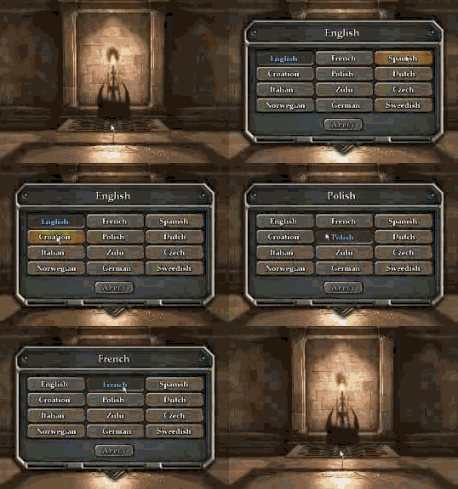
It is a good idea to enclose the entire block of drawing calls in a condition, so that you can enable or disable the menu with it.
Here, a click to the area of the 'Apply' button (at the bottom) changes the condition variable that controls whether the menu is to be displayed or not; if it's not, then execution in the GUI hook bypasses the entire script block for the menu, and nothing gets called.
___________
**Of course
GrimTK (as THOM mentioned) makes this a lot easier and straight forward to implement.

 .
.

