hello ,
i wish to know how to import a bump texture in game
well i mean , may i have to combine my bump to my diff or seperatly then to import on material script?
hope this is clear
thx
texture question

Re: texture question
I answered here:
viewtopic.php?f=14&t=4776&start=40#p50711
viewtopic.php?f=14&t=4776&start=40#p50711
Dungeon Master Resource Pack worker and passionated Beer drinker
-
odinsballs

- Posts: 288
- Joined: Thu Dec 20, 2012 4:25 pm
- Location: south of heaven
Re: texture question
i myself use crazybump to generate al needed maps be they normal, diffuse, or bump (displacement) drawback is that its not freeware. but as i said if u have textures that are wrapped to model send me the diffuse files and i'll fix it for you 
Re: texture question
i will try odin , just thing that i dont understand that is my bump seems to be saved on my normal ^^
i will try to send you a package soon
i will try to send you a package soon
Re: texture question
well in fact i think my problem is my spec , there is something on spec i am missing , maybee something with material who interfere
Re: texture question
Maybe you can post an example of your specular map?
But i see in your shots (other post) that the normal map is not working correct.
I´ve had issues with that, too.
And again, if you use blender, you do not need any second software to create a normal map!
But i see in your shots (other post) that the normal map is not working correct.
I´ve had issues with that, too.
And again, if you use blender, you do not need any second software to create a normal map!
Dungeon Master Resource Pack worker and passionated Beer drinker
Re: texture question
i just need sculptris for unwraping (and modelize of course) , all will be better if i knw how to make a good unwrap
ps : i will send you different source , maybee you will understand my prob with files
ps : i will send you different source , maybee you will understand my prob with files

Re: texture question
What Germanny said, your normal map is not working. The specular is hard to see since the texture from Filterforge you use is not a diffuse map, but an image of the diffuse map with the normal and spec map applied. Also, Filterforge textures usually come with a pretty good normal map (the purple texture), just download it and use it.
One other (and likely) reason why the normal map could not be working is that you forgot to update tangent space. You can do this in the GMT, just click on Model>Recalculate Tangents.
On a side note, Sculptris is not suited for making game models. It's a very basic and super easy to use sculpting program (and it is fun!), which means you can make some nice looking models without much effort. But the models will have far, far too many polygons to be useful for a game and you're very limited in what you can do. I suggest you learn how to use Blender and how to make low poly models. It takes more effort to learn, but the result will be much more satisfying as well.
One other (and likely) reason why the normal map could not be working is that you forgot to update tangent space. You can do this in the GMT, just click on Model>Recalculate Tangents.
On a side note, Sculptris is not suited for making game models. It's a very basic and super easy to use sculpting program (and it is fun!), which means you can make some nice looking models without much effort. But the models will have far, far too many polygons to be useful for a game and you're very limited in what you can do. I suggest you learn how to use Blender and how to make low poly models. It takes more effort to learn, but the result will be much more satisfying as well.
Re: texture question
i am on both formation , blender and sculptris , and there is a loooooooooooot of informations to learn haha , btw , there is much solution in sculptris to low you poly , tools that low your model to have less poly , all the model i maded on game with scultris have less than 10K poly .
well other thing i noticed on import is that i have (null) material on object when they came from sculptris (wel in gmt when i apply exture he said (null) material maybee the problem is here
i will test to recalculate tangent
i understand what you mean with filter forge , let me check my source i will made a zip so you can really see where is the problem
thx for help
meatball (made on blender)
http://www.sendspace.com/file/dwhnl2
and door (made on sculptris)
http://www.sendspace.com/file/pgpeyw
well other thing i noticed on import is that i have (null) material on object when they came from sculptris (wel in gmt when i apply exture he said (null) material maybee the problem is here
i will test to recalculate tangent
i understand what you mean with filter forge , let me check my source i will made a zip so you can really see where is the problem
thx for help
meatball (made on blender)
http://www.sendspace.com/file/dwhnl2
and door (made on sculptris)
http://www.sendspace.com/file/pgpeyw
Re: texture question
Well those meatball is mesh intense - for a simple ball. Anyway, i change your uv a bit and make textures for that, include normal map.
Your normal map does not include the real mesh tangents - now it has.
I add ambient occlusion to the diffuse.
Not tested, but should work better.
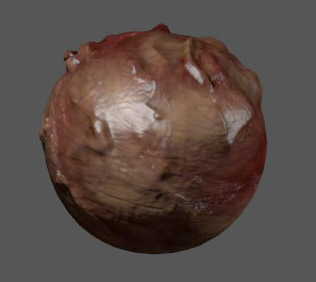
Temporary DL here:
meateye.zip
*edit: the spec map is now inverted. better? (black=no spec, white=full spec)
Your normal map does not include the real mesh tangents - now it has.
I add ambient occlusion to the diffuse.
Not tested, but should work better.
Temporary DL here:
meateye.zip
*edit: the spec map is now inverted. better? (black=no spec, white=full spec)
Last edited by germanny on Sat Jan 12, 2013 5:21 pm, edited 1 time in total.
Dungeon Master Resource Pack worker and passionated Beer drinker