Texture Alpha channels ~does LoG support more than on/off?

Texture Alpha channels ~does LoG support more than on/off?
I notice that various DDS formats are supported, dxt1 with or without alpha; dxt5 with alpha ~even dxt3 with alpha... but so far I only see either full opaque or full transparent when I make a material with an alpha test. Am I doing something wrong, or does the engine only support true/false, on/off, ones&zeros on the alpha channel? I cannot seem to get partial transparency.

Re: Texture Alpha channels ~does LoG support more than on/of
Hi, i tested this for a long time.
Seems to me full alpha is not supported!
Only full opaque or full transparent.
With other blendMode as "Opaque" it works, but the material is 'glowing" then.
(blendMode = "Translucent", blendMode = "Additive",)
Hope this will work in log2!
Seems to me full alpha is not supported!
Only full opaque or full transparent.
With other blendMode as "Opaque" it works, but the material is 'glowing" then.
(blendMode = "Translucent", blendMode = "Additive",)
Hope this will work in log2!
Dungeon Master Resource Pack worker and passionated Beer drinker

Re: Texture Alpha channels ~does LoG support more than on/of
I´ve found a way to make the alpha channel as translucent as you will.
In Photoshop save the DDS file as "DXT5 ARGB 8 bpp | interpolated alpha". But before saving click in the opened "NVIDIA dds Format window" on the "Normal Map Settings" and change the option "Height Source" to "Alpha Channel".
Then you can define in your Material.lua the material with " blendMode = "Translucent", ".
This should work now and you can make the alpha channel as translucent as you will and see the result in the editor.
In Photoshop save the DDS file as "DXT5 ARGB 8 bpp | interpolated alpha". But before saving click in the opened "NVIDIA dds Format window" on the "Normal Map Settings" and change the option "Height Source" to "Alpha Channel".
Then you can define in your Material.lua the material with " blendMode = "Translucent", ".
This should work now and you can make the alpha channel as translucent as you will and see the result in the editor.
Re: Texture Alpha channels ~does LoG support more than on/of
I'm going to have to try this when I get a chance.maneus wrote:I´ve found a way to make the alpha channel as translucent as you will.
In Photoshop save the DDS file as "DXT5 ARGB 8 bpp | interpolated alpha". But before saving click in the opened "NVIDIA dds Format window" on the "Normal Map Settings" and change the option "Height Source" to "Alpha Channel".
Then you can define in your Material.lua the material with " blendMode = "Translucent", ".
This should work now and you can make the alpha channel as translucent as you will and see the result in the editor.

*I knew that DXT1 was only a 1 bit alpha; and did try DXT5... but never with translucent mode (I don't think.. or recall).
-
Skuggasveinn

- Posts: 562
- Joined: Wed Sep 26, 2012 5:28 pm
Re: Texture Alpha channels ~does LoG support more than on/of
you can use interpolated alpha for this but like Germanny said, the object will light up and not fade into the darkness like normal.
You can grab the flooded dungeon source (the water is using this)
http://grimrock.nexusmods.com/mods/119/ ... D119&pUp=1
also the windows in the secret doors extra also on nexus.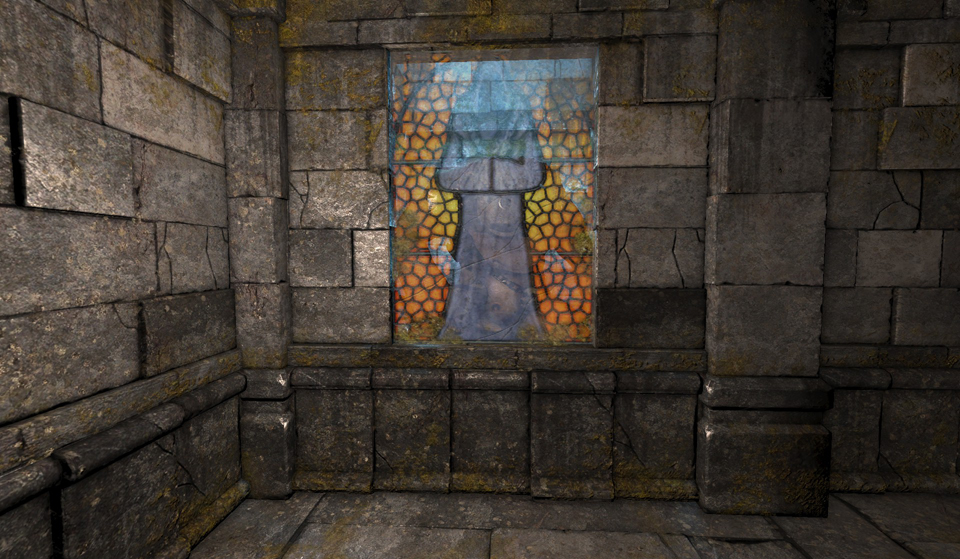 Skuggasveinn.
You can grab the flooded dungeon source (the water is using this)
http://grimrock.nexusmods.com/mods/119/ ... D119&pUp=1
also the windows in the secret doors extra also on nexus.
SpoilerShow
Re: Texture Alpha channels ~does LoG support more than on/of
That is a really neat effect!Skuggasveinn wrote:you can use interpolated alpha for this but like Germanny said, the object will light up and not fade into the darkness like normal.
You can grab the flooded dungeon source (the water is using this)
http://grimrock.nexusmods.com/mods/119/ ... D119&pUp=1
also the windows in the secret doors extra also on nexus.Skuggasveinn.SpoilerShow
Re: Texture Alpha channels ~does LoG support more than on/of
That is not really true Skugga.
As you can see in my picture, the white of the glas isn´t lighten up and the green liquid isn´t too.
Picture:

As you can see in my picture, the white of the glas isn´t lighten up and the green liquid isn´t too.
Picture:
Re: Texture Alpha channels ~does LoG support more than on/of
What's that room look like with no torch? (Aside from looking very cool )
)-
Skuggasveinn
- Posts: 562
- Joined: Wed Sep 26, 2012 5:28 pm
Re: Texture Alpha channels ~does LoG support more than on/of
But when you walk away from it, does is get shaded into darkness ?,maneus wrote:That is not really true Skugga.
As you can see in my picture, the white of the glas isn´t lighten up and the green liquid isn´t too.
What I meant was that the engine renders it to a far greater distance then the objects around it, didn't mean ligth up as in a light source.
Re: Texture Alpha channels ~does LoG support more than on/of
Ah , that was what you mean. Then I´ve understand it totally wrong. Sorry, my fault.
No, it dosn´t get shaded.

No, it dosn´t get shaded.