Page 2 of 4

Simple Short Tutorial

Posted: Wed Oct 03, 2012 6:31 pm
by djoldgames
Create Texture: any image contains wooden planks, resize to 256x256 / 512x512 / 1024x1024 (32*2*n)
Blender: new project with basic cube
Image
Blender: add UV map to cube faces: Select face - Mesh - UV unwrap - Unwrap
Image
Blender: optional - rename material
Blender: File - Export - Wavefron (.obj)
GMT (Grimrock Model Toolkit): Import OBJ Model
GMT: Tools - Material Find / Replace - replace (or check) the right material name
Image
GMT: File - Save (.model) - wooden_cube.model
Photoshop: Export texture to DDS format: Save as Nvidia DDS format DXT3 (downloadable plugin for Photoshop)
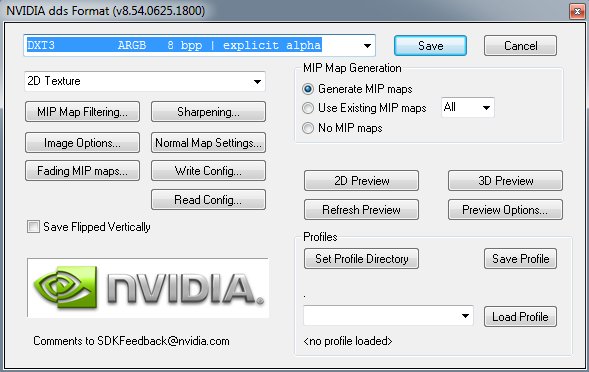
Image
Photoshop: Save texture as wooden_planks_dif.dds
Copy wooden_cube.model to your Grimrock "/mod_assets/models/wooden_cube.model"
Copy wooden_planks_dif.dds to your Grimrock "/mod_assets/textures/wooden_planks_dif.dds"
Edit "/mod_assets/models/scripts.lua":

Code: Select all

defineMaterial{
	name = "wooden_planks",
	diffuseMap = "mod_assets/textures/wooden_planks_dif.tga",
	-- specularMap = "",
	-- normalMap = "",
	doubleSided = false,
	lighting = true,
	alphaTest = false,
	blendMode = "Opaque",
	textureAddressMode = "Wrap",
	glossiness = 30,
	depthBias = 0,
}
Edit "/mod_assets/models/objects.lua":

Code: Select all

cloneObject{
	name = "wooden_cube",
	baseObject = "barrel_crate_block",
	model = "mod_assets/models/wooden_cube.fbx",
}
Grimrock Editor: Open/Reload your project, place "wooden_cube" anywhere
Image

Next to work is creating the other 2 textures (normal map and specular map) for make it looks better...

Re: Modeling a new item - what am I doing wrong ?

Posted: Wed Oct 03, 2012 8:27 pm
by Phitt
Like in other games I've modded there seems to be a bit of confusion about which dds format you need to choose for saving your textures. To avoid unnecessarily large file sizes I'd like to clear things up a bit (I'm not a pro, but I've used the dds format for years and I hope I know what I'm talking about - if you have something to add or if you think I'm wrong please tell me).

There are only 4 formats of interest for us Grimrock modders - DXT1/no alpha, DXT1/1 bit alpha, DXT5 and 8.8.8 RGB. You need different formats for different purposes and it's quite simple to choose the one you need.

1. Diffuse texture. If your diffuse texture has no transparency (alpha channel) then save it as DXT1/no alpha. If it has transparency then save it either as DXT1/1 bit alpha or as DXT5. DXT1/1 bit alpha can only be used if your alpha channel is completely made up of either black or white pixels. Shades of gray aren't supported, for that you need DXT5. Also note that the quality in the RGB channel of DXT1/1 bit alpha is even a tiny, tiny bit worse than DXT1/no alpha. DXT1/1 bit alpha has the same file size as DXT1/no alpha, DXT5 has twice the filesize as DXT1, so it is quite important to safe in the correct format.

DXT is a compressed format, so always back up the original texture as PSD/whatever format GIMP uses (which you should do anyway since the image will be flattened when saved as dds). There are uncompressed formats (8.8.8(.8)), but for diffuse textures the quality difference is so minimal it is simply not worth the huge increase in file size (for example a 1024x1024 texture saved as DXT1 has 682kb, while it has 4mb if saved as 8.8.8 RGB). There is also DXT3, but the alpha channel of DXT3 looks like crap and it has the same file size as DXT5. I never understood what it is good for.

2. Specular map. Safe as DXT1/no alpha.

3. Normal map. The problem with normal maps and compressed formats like DXT1/5 is that the compression often causes very ugly and noticeable artifacts on the normal map. How noticeable the artifacts are depends on the normal map, but often an uncompressed texture is required to avoid those artifacts. That's why you usually should safe normal maps in 8.8.8 RGB format. That format has a huge file size, so maybe looking at the results with DXT1 first may be a good idea. Why the normal maps for Grimrock were apparently saved as 8.8.8.8 ARGB is something I don't understand, maybe the devs could clear this up. EDIT: Apparently for technical reasons it is a good idea (or at least not a bad idea) to save the normal map as 8.8.8.8 ARGB instead of 8.8.8 RGB, even if you don't need the alpha channel and even though the file size is larger.

Re: Modeling a new item - what am I doing wrong ?

Posted: Wed Oct 03, 2012 9:41 pm
by petri
Re: 32-bit normal maps: RGB without alpha is 24-bits and not widely supported by GPUs. Therefore 24-bit maps are internally converted to 32-bits, so it's more efficient to load them if they're in the "native" 32-bit format.

Also DXT1 with 1-bit alpha is pretty much useless because when the alpha is zero, the color is also black which causes ugly dark halos with texture filtering.

Re: Modeling a new item - what am I doing wrong ?

Posted: Wed Oct 03, 2012 9:57 pm
by Phitt
petri wrote:Re: 32-bit normal maps: RGB without alpha is 24-bits and not widely supported by GPUs. Therefore 24-bit maps are internally converted to 32-bits, so it's more efficient to load them if they're in the "native" 32-bit format.

Also DXT1 with 1-bit alpha is pretty much useless because when the alpha is zero, the color is also black which causes ugly dark halos with texture filtering.
Didn't know about the 32/24 bit thing, thanks for clearing that up. I thought smaller file size = better, but apparently it's more complicated than that.

From all I can see you used DXT1/1 bit alpha for some textures (example: gobelin textures), I've never used it myself, but I figured it might be a good idea after seeing that since it cuts the file size in half compared to DXT5.

Re: Modeling a new item - what am I doing wrong ?

Posted: Wed Oct 03, 2012 11:25 pm
by petri
Really? I didn't know we were using dxt1 with alpha anywhere :)

Re: Modeling a new item - what am I doing wrong ?

Posted: Thu Oct 04, 2012 1:04 am
by Blichew
Blichew wrote: 3. Item icon is ok, except it's 4 of them in one square (again sizing issue or does it have something to do with mipmaps in .dds ?)
Back to this issue for a while, this is what I'm getting (now it's even 9 of them in one square):
Image

my exported dds is 256x256 where coin item is about 25x25 size in the middle of index "0" area of the file. Center of the coin is @ (37,37):
SpoilerShow
Image
DDS export properties (from gimp):
SpoilerShow
Image
As for the model itself:
JohnWordsworth wrote: 2. Make sure that you save your texture with BC3/DXT5 compression and have ticked "Generate Mipmaps". Other settings might work, but these settings definitely do!
That really helped, thanks :) - that's starts to look like something:
SpoilerShow
Image
I know it's just a small coin, but it's a huge step, 2 days ago all I knew about blender was that it's for making drinks :P - and yes, Tools -> Edit Node transform dialog was more than enough to change the size

One more thing: When I tried to create a normal map for this texture the editor wouldn't load saying that: "Unknown uncompressed DDS pixel format in coin_normal.dds".
This is how I tried to create a normal map:

1. Installed the plugin for normalMap filter
2. Loaded my original gif texture to gimp, normalMap disabled for gifs aparently
3. Converted the gif to jpg (max quality, etc.)
4. Opened the jpg in gimp, applied filter
5. Exported to coin_normal.dds, tried with BC1/DXT1 (modding reference said that without alpha channel, which jpg doesn't have, i should use dxt1), BC3/DXT5 (just to try)
6. Defined normalMap in materials.lua
7. Editor reporting error described above.

Again, what am I doing wrong :P ?

Re: Modeling a new item - what am I doing wrong ?

Posted: Thu Oct 04, 2012 6:41 am
by petri
Item icons are 75x75

Re: Modeling a new item - what am I doing wrong ?

Posted: Thu Oct 04, 2012 7:03 am
by Blichew
I know that, I was trying to achieve something like your blue gem item. Icon is smaller and in the center of inventory square.
Did you create that by doing anything other but putting the icon in the center of 75x75 square leaving the rest transparent ?

Re: Modeling a new item - what am I doing wrong ?

Posted: Thu Oct 04, 2012 7:29 am
by antti
Maybe the exporter (for some unfathomable reason) trims "blank" pixels away from the picture. If so, the image should be cropped if you import back the exported dds-texture.

Re: Modeling a new item - what am I doing wrong ?

Posted: Thu Oct 04, 2012 7:53 am
by Blichew
Importing it back to gimp shows transparent background correctly.