Page 1 of 2
Normal Maps help.
Posted: Mon Oct 08, 2012 6:46 am
by Wolfen
Hi all,
I am currently having issues with getting my normal maps to work. Has anyone made some normal maps and had success with them? Can you tell me what exporter you are using, what settings you have, and any other details about your normal maps, such as do you have an alpha channel in it, etc?
I am using the nVidia DDS exporter myself from Photoshop, but I am really not seeing anything happen. I have even tried duplicating the first output, overlaying it on the original, and blurring slightly, and repeating this step many times to increase the intensity of the map and it just does not seem to be doing anything.
So any information would be greatly appreciated.
Re: Normal Maps help.
Posted: Mon Oct 08, 2012 9:10 am
by Daght
try using DDS converter 2. My photoshop do the same with alpha channels.
Re: Normal Maps help.
Posted: Mon Oct 08, 2012 9:20 am
by Wolfen
Hmmm. What do you mean does the same with the alpha channel. I thought the normal needed an alpha channel. When I compared my export to one from Grimrocks pack, it looked identical in what it output. Alpha channel, etc.
Ill give it a try though. Thanks.
However, aside from that I still wonder if there is just something really stupid I am overlooking.
Re: Normal Maps help.
Posted: Mon Oct 08, 2012 11:25 am
by djoldgames
I am using nVidia plugin for saving to DDS format and it working great.
If you have no problem with your DIF and SPEC maps (created by the same exporter), your trouble are elsewhere.
To finalize Normal maps I use nVidia filter/plugin for Photoshop on my new created grey map and then save this file as DDS with these settings:
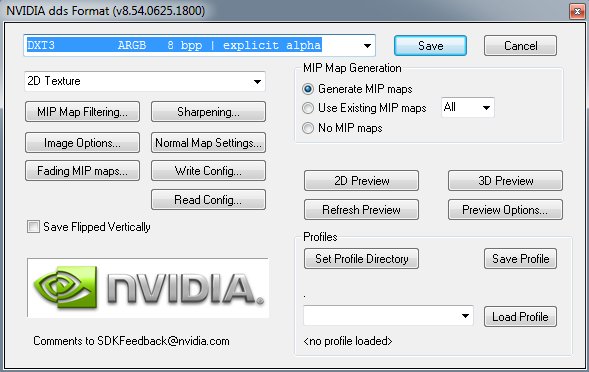
Note: If I create new objects and import them to grimrock using GMT [WIP], normal maps are not yet working for me ;-(
Re: Normal Maps Tutorial
Posted: Mon Oct 08, 2012 11:27 am
by djoldgames
If you want to create the right Normal maps, this excellent tutorial will help you:
http://img521.imageshack.us/img521/9046 ... tutrf7.jpg
Re: Normal Maps help.
Posted: Mon Oct 08, 2012 11:38 am
by Wolfen
djoldgames wrote:I am using nVidia plugin for saving to DDS format and it working great.
If you have no problem with your DIF and SPEC maps (created by the same exporter), your trouble are elsewhere.
To finalize Normal maps I use nVidia filter/plugin for Photoshop on my new created grey map and then save this file as DDS with these settings:
Note: If I create new objects and import them to grimrock using GMT [WIP], normal maps are not yet working for me ;-(
If you want to create the right Normal maps, this excellent tutorial will help you:
http://img521.imageshack.us/img521/9046 ... tutrf7.jpg
Interesting. You are using DXT3. I thought DXt5 was required for having the alpha channel (even though it isnt used, I even saw the alpha channel in their normal maps in DDS).
As for that link, I happened to glance that yesterday and I think I may give that method a whirl. For bricks anyways it might make sense. My concern is more about the other details on those bricks. Anyways. Thanks for the info. =)
Re: Normal Maps help.
Posted: Mon Oct 08, 2012 12:16 pm
by JohnWordsworth
Hi @Wolfen, are you (a) overwriting an existing material with a new normal map, (b) cloning a model and re-texturing it with GMT, (c) creating a new model and importing it with GMT or (d) something else?
(a) You can redefine a material to overwrite the existing one if you want to change the normal map of an existing material (across all standard content). If this is failing, it is likely a DDS format issue.
(b) This should also work fine, as the tangent and bi-tangent data is retained from the original mesh, so again - perhaps it's a DDS format issue.
(c) This is not yet supported by GMT. When you import from OBJ, there are no tangents/bi-tangents on the model yet, so Normal maps will never have an effect on the model. Using GMT, you will never see any effect from a NormalMap on your model, as the required data for the engine to draw it is not there yet.
(d) If this is the case, please let us know what the scenario is!
Re: Normal Maps help.
Posted: Mon Oct 08, 2012 12:53 pm
by Wolfen
JohnWordsworth wrote:Hi @Wolfen, are you (a) overwriting an existing material with a new normal map, (b) cloning a model and re-texturing it with GMT, (c) creating a new model and importing it with GMT or (d) something else?
(a) You can redefine a material to overwrite the existing one if you want to change the normal map of an existing material (across all standard content). If this is failing, it is likely a DDS format issue.
(b) This should also work fine, as the tangent and bi-tangent data is retained from the original mesh, so again - perhaps it's a DDS format issue.
(c) This is not yet supported by GMT. When you import from OBJ, there are no tangents/bi-tangents on the model yet, so Normal maps will never have an effect on the model. Using GMT, you will never see any effect from a NormalMap on your model, as the required data for the engine to draw it is not there yet.
(d) If this is the case, please let us know what the scenario is!
Hey John, Great questions!
A. Yes overwriting existing textures and .models. Just because it was easy. However,
C. Yes, created a new wall piece .model, which I guess answers that problem.
So this leads me to ask a new question. How is the model tied to a normal map in the way you described? I always was under the "assumption" that the normal map was just a 2d rendering pass of sorts that mimics depth based on the 2d information provided. I had no clue it was related to the models in some way other than being rendered onto the model in general.
Re: Normal Maps help.
Posted: Mon Oct 08, 2012 3:07 pm
by Kuningas
I actually had no idea how the different maps worked before this! Thanks!
Now I'll do some further research...
Re: Normal Maps help.
Posted: Mon Oct 08, 2012 3:14 pm
by JohnWordsworth
I'm afraid I've only had a cursory read about tangents and bi-tangents so far, so I can't give you a full definition of their purpose with normal/bump mapping. However, in order to apply bump mapping to a surface, you apparently need to know not only the normal vector relative to a triangle (pointing away from the surface), but also the two perpendicular vectors that point along the surface of that triangle too. Without this data existing in the model file, the game doesn't know how to render the bump mapping through the normal map.
So, re-texturing an existing model is fine if you simply load it in the GMT, rename the material and save it. As I continue to use the tangent/bi-tangent from the original file.
However, this data is not saved in OBJ format, so I need to generate this information for imported meshes in the GMT, which I simply haven't got around to yet. I'll be adding a button to the app to generate tangent/bi-tangent data for a mesh sometime soon

.
