Page 1 of 5
Statue Comes to life
Posted: Wed Oct 24, 2012 6:50 am
by HaunterV
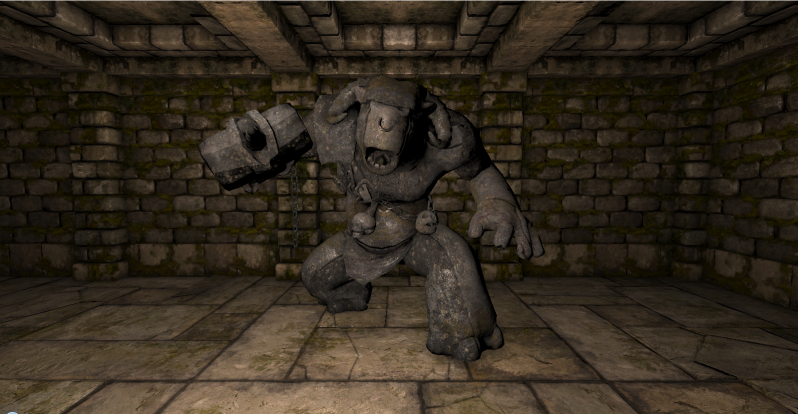
I need a monster statue.
Can someone make either a Warden or an Ogre statue for me please?
I am having a statue come to life and attack the player after an event so life would be easier if the statue was a monster statue... otherwise I'll need to lock up an ogre in a closet and unleash it that way.
a Plus would be a stone textured ogre.
Re: Statue Comes to life
Posted: Wed Oct 24, 2012 10:47 am
by Komag
I could be stone textured and then "bust out" of the stone and be normal colored (by swapping the model for the real monster), or if you want a "stone coming alive to fight" situation then that's cool too
Re: Statue Comes to life
Posted: Wed Oct 24, 2012 11:11 am
by Kuningas
Retexturing it should be easy enough, but is it possible to "freeze" common enemies so they don't play their idle animations or move around? This, as mentioned, could be circumvented by making a separate model for the statue and swapping it with the monster.
Re: Statue Comes to life
Posted: Wed Oct 24, 2012 11:17 am
by Grimwold
Kuningas wrote:Retexturing it should be easy enough, but is it possible to "freeze" common enemies so they don't play their idle animations or move around? This, as mentioned, could be circumvented by making a separate model for the statue and swapping it with the monster.
With hooks it is possible to hold a monster, just have onMove; onTurn; onAttack all return false.
I used a similar effect in my new "Hold Monster" Spell.
viewtopic.php?f=14&t=3475&start=80#p39822
EDIT - so... you could define a cloned ogre and use the above hooks to make it inanimate... then when the players activate said event destroy it and spawn a real ogre!!!
Re: Statue Comes to life
Posted: Wed Oct 24, 2012 12:01 pm
by Neikun
Re: Statue Comes to life
Posted: Wed Oct 24, 2012 3:49 pm
by Ciccipicci
If i wanna put this great stone ogre in my dungeon as a normal enemy, what code I'll have tu put into the materials.lua and monsters.lua?
Re: Statue Comes to life
Posted: Wed Oct 24, 2012 8:56 pm
by HaunterV
God that's awesome. Thank you so much.
Now to tweak its defense and attack. I also want to remove it's charge move. but for that I can just look at my mini ogre's code.
onMove; onTurn; onAttack all return false.
Just these need to return false? or are there other things as well?
Also, does anyone know where to find a large puff of smoke? I figure that's the best way to disguise the statue -> Live stone ogre transition.
Re: Statue Comes to life
Posted: Wed Oct 24, 2012 10:45 pm
by Neikun
In my monster code I gave it warden sound effects.
@Ciccipicci, no new materials are needed. (Don't you recognize the temple floor material?)
I have mine saved in my models folder, so my script looks like this:
Code: Select all
defineObject{
	name = "stone_ogre",
	class = "Monster",
	model = "mod_assets/models/stone_ogre.fbx",
	meshName = "tunnel_ogre_mesh",
	animations = {
		idle = "assets/animations/monsters/tunnel_ogre/tunnel_ogre_idle.fbx",
		moveForward = "assets/animations/monsters/tunnel_ogre/tunnel_ogre_walk.fbx",
		turnLeft = "assets/animations/monsters/tunnel_ogre/tunnel_ogre_turn_left.fbx",
		turnRight = "assets/animations/monsters/tunnel_ogre/tunnel_ogre_turn_right.fbx",
		attack = "assets/animations/monsters/tunnel_ogre/tunnel_ogre_attack.fbx",
		attack2 = "assets/animations/monsters/tunnel_ogre/tunnel_ogre_attack_stab.fbx",
		--attack3 = "assets/animations/monsters/tunnel_ogre/tunnel_ogre_attack_two_handed.fbx",
		--attack4 = "assets/animations/monsters/tunnel_ogre/tunnel_ogre_attack_leap.fbx",
		turnAttackLeft =  "assets/animations/monsters/tunnel_ogre/tunnel_ogre_attack_left.fbx",
		turnAttackRight =  "assets/animations/monsters/tunnel_ogre/tunnel_ogre_attack_right.fbx",
		getHitFrontLeft = "assets/animations/monsters/tunnel_ogre/tunnel_ogre_get_hit_front_left_02.fbx",
		getHitFrontRight = "assets/animations/monsters/tunnel_ogre/tunnel_ogre_get_hit_front_right_02.fbx",
		getHitBack = "assets/animations/monsters/tunnel_ogre/tunnel_ogre_get_hit_back_02.fbx",
		getHitLeft = "assets/animations/monsters/tunnel_ogre/tunnel_ogre_get_hit_left_02.fbx",
		getHitRight = "assets/animations/monsters/tunnel_ogre/tunnel_ogre_get_hit_right_02.fbx",
		fall = "assets/animations/monsters/tunnel_ogre/tunnel_ogre_get_hit_back_02.fbx",
		rushBegin = "assets/animations/monsters/tunnel_ogre/tunnel_ogre_rush_begin.fbx",
		rushContinue1 = "assets/animations/monsters/tunnel_ogre/tunnel_ogre_rush_continue_right_step.fbx",
		rushContinue2 = "assets/animations/monsters/tunnel_ogre/tunnel_ogre_rush_continue_left_step.fbx",
		rushHit1 = "assets/animations/monsters/tunnel_ogre/tunnel_ogre_rush_hit_right_step.fbx",
		rushHit2 = "assets/animations/monsters/tunnel_ogre/tunnel_ogre_rush_hit_left_step.fbx",
	},
	moveSound = "warden_walk",
	footstepSound = "warden_footstep",
	attackSound = "warden_attack",
	impactSound = "warden_impact",
	hitSound = "ogre_hit",
	dieSound = "ogre_die",
	rushBeginSound = "ogre_rush_begin",
	--soundClipDistance = 8,
	hitEffect = "hit_blood",
	capsuleHeight = 0.6,
	capsuleRadius = 0.6,
	health = 700,
	sight = 4,
	attackPower = 80,
	accuracy = 30,
	protection = 17,
	evasion = -10,
	coolDown = { 2, 3 },
	movementCoolDown = 2,
	noRecoilInterval = { 0.1, 1.0 }, -- interval must end at 1, otherwise turn attack can be interrupted (looks ugly)
	exp = 750,
	lootDrop = { 100, "ogre_hammer" },
	healthIncrement = 50,
	attackPowerIncrement = 10,
	protectionIncrement = 1,
	brain = "Ogre",
	onDealDamage = function(self, champion, damage)
		party:shakeCamera(0.5, 0.3)
		party:playScreenEffect("damage_screen")
	end
}
Re: Statue Comes to life
Posted: Wed Oct 24, 2012 11:29 pm
by HaunterV
oo! brain = ogre
so if brain = melee it wont ogre charge! right?
on the other hand if i can make the screen shake with the ogre charge... that should be frightening right? Screen shake, ogre shouting, lights dimming, dust flying, players dying... fun!
Re: Statue Comes to life
Posted: Wed Oct 24, 2012 11:34 pm
by Grimwold
HaunterV wrote:
onMove; onTurn; onAttack all return false.
Just these need to return false? or are there other things as well?
Yeah, those 3 should do it... it doesn't have ranged attack which is the only other relevant hook.
Give it a try with a simple cloned monster by adding the following to the definition.
Code: Select all
onMove = function(monster,direction)
  return false
end
onTurn = function(monster,direction)
  return false
end
onAttack  = function(monster,attack)
  return false
end
That monster will never move, turn or attack!
Of course for your actual statue you could set up a variable in a script entity (something like statue = 1) and each hook would check the value of that variable...
Code: Select all
statue =1

function checkStatue()
if statue == 1 then
  return false
elseif statue == 0 then
  return true
end
so when you want it to turn from a statue to a monster all you have to do is change the variable.
Code: Select all
function transformStatue()
  statue = 0
end