Page 1 of 2
Has anyone created a fade-to-white effect?
Posted: Tue Nov 20, 2012 12:26 am
by Komag
I've tried to make a fade-to-white effect, with only very limited success. I can do:
party:playScreenEffect("fade_white")
with a custom particle effect defined for fade_white:
Code: Select all
defineParticleSystem{
	name = "fade_white",
	emitters = {
		-- glow
		{
			spawnBurst = false,
			emissionRate = 1,
			emissionTime = 1,
			maxParticles = 1,
			boxMin = {0,0,1},
			boxMax = {0,0,1},
			sprayAngle = {0,360},
			velocity = {0,0},
			texture = "assets/textures/particles/glow.tga",
			lifetime = {10, 10},
			colorAnimation = false,
			color0 = {1, 1, 1},
			opacity = 1,
			fadeIn = 5,
			fadeOut = 5,
			size = {50, 50},
			gravity = {0,0,0},
			airResistance = 0.3,
			rotationSpeed = 1,
			blendMode = "Additive",
		}
	}
}
It sorta works, but when the player moves around it gets messed up.
Any ideas?
Re: Has anyone created a fade-to-white effect?
Posted: Tue Nov 20, 2012 2:19 am
by Neikun
What if you made it even bigger?
Re: Has anyone created a fade-to-white effect?
Posted: Tue Nov 20, 2012 2:56 am
by Edsploration
I just spent a bit of time messing with this. I found the boxMin and boxMax should both = {0,0,0} for the particle to be in front of the camera with the party facing in any direction.
The simplest option is have the party's onMove and possibly onTurn hooks call a function which checks if the fade is underway. If so, return false preventing movement.
For a moving party... well I don't think moving particle effects is possible, so I wrote this code to spawn a box of them around the player with radius 'r':
Code: Select all
local r=3
for x=-r,r do
	for y=-r,r do
		spawn("fx", party.level, party.x+x, party.y+y, 0)
			:setParticleSystem("fade_white")
	end
end
A larger 'r' will make most of the screen go to white much faster, so I upped the fade-in time to 10 to compensate. It looks decent, but the floor tiles still pop into view during the move animation.
A more advanced method would probably be a custom asset with the particle effect assigned to it, or whatever it takes to make an animated translucent texture (if that's possible). Model a custom asset box around the camera's coordinates with internal faces and spawn/destroy it on a fast timer with shootProjectile (with zero velocity) to the player's x,y location.
This is basically the same method I'll be using in my next mod to create a skybox.
Re: Has anyone created a fade-to-white effect?
Posted: Tue Nov 20, 2012 3:17 am
by Komag
thanks for the ideas. I already decided to freeze the player in place for it with the hooks as you suggested, so that's probably how I'll leave it for now. odd that it must be 0,0,0 for you - I messed with those a while and 0,0,0 was always behind me, I had to move the z forward, and so 0,0,1 seemed to end up in the center of the tile, but I'll test it some more to what was going on there.
and yeah, I'll. make it bigger and also tweak the fade time, etc. I was just hoping for a whole different method, and that custom white interior box sounds quite promising for perhaps a future project (or maybe I'll change my mind and attempt it for this, but I don't think I'm capable enough)
Re: Has anyone created a fade-to-white effect?
Posted: Tue Nov 20, 2012 12:03 pm
by Komag
I've found that if you use party:playScreenEffect("fade_white") then it can be "overwritten" by the screeneffect of getting hit by a slime spell or a fireball spell (as from a goromorg or uggardian), completely wiping out the fade-to-white even if it was only halfway done.
If I'm going to freeze the player in place (but still allow looking), then it works much better to spawn in an fx entity to the player position, as it is independent
Re: Has anyone created a fade-to-white effect?
Posted: Tue Nov 20, 2012 12:57 pm
by Neikun
I would like to see it in action if you've got it sorted :3
Re: Has anyone created a fade-to-white effect?
Posted: Tue Nov 20, 2012 1:38 pm
by JohnWordsworth
Some suggested tweaks if you are planning on getting it working with the playScreenEffect() method...
spawnBurst = true: Ok, not necessary, but probably a good sanity check to ensure that the effect only spawns once.
emissionTime = 0: Will make it start immediately (I don't know if you set it to 1 intentionally?)
objectSpace = true: This is the kicker - it will make the effect play 'on the screen' instead of 'in world space', which means if you move etc, it shouldn't matter.
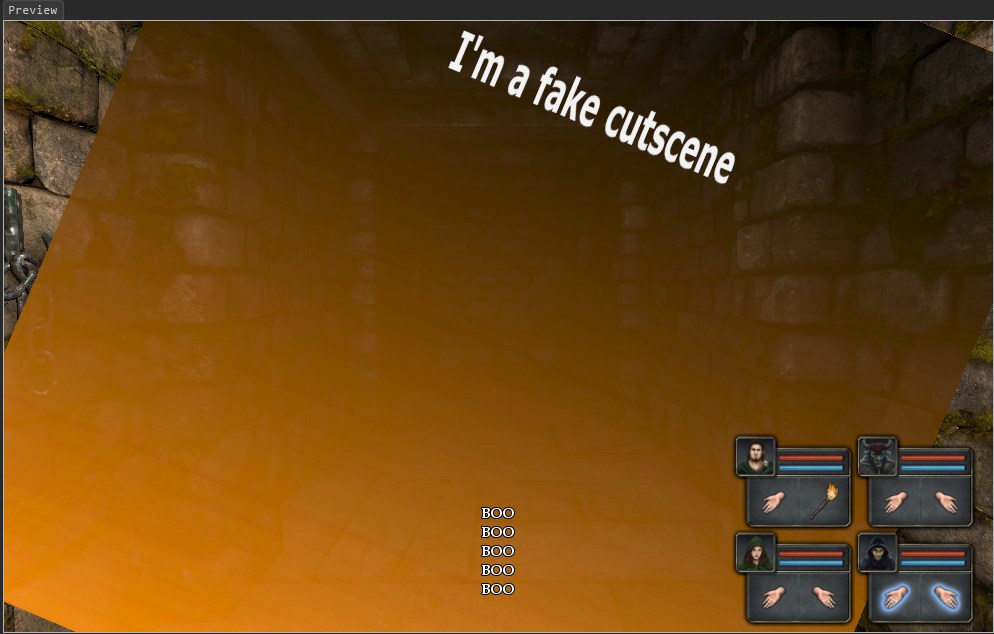
I had a cool idea to use this system to spawn very large particles (1024x512) with lots of text on in screen space. It damn nearly worked too as a way of immitating an in-game cut-scene sequence. Unfortunately, you can't control the angle at which a particle is spawned. I doubt the engine would be too happy with particles that big anyway :p.
Re: Has anyone created a fade-to-white effect?
Posted: Tue Nov 20, 2012 1:42 pm
by Neikun
You can actually, I think. by setting a very specific range for sprayAngle =
It is a min-max value for the angle the particle effect comes out of.
So if the min and max are the same value, it should only appear there.
Re: Has anyone created a fade-to-white effect?
Posted: Tue Nov 20, 2012 1:47 pm
by JohnWordsworth
I did try that. I might have been doing something wrong, but in the example shown above, sprayAngle = {0,0}. I wonder if sprayAngle is the region in which particles can be emitted like, we'll throw them out of this specific 20 degree arc).
Still, this should still work for a uniform particle (white/black) for 'Fade-to' effects!
Re: Has anyone created a fade-to-white effect?
Posted: Tue Nov 20, 2012 4:22 pm
by Komag
JohnWordsworth wrote:
spawnBurst = true: Ok, not necessary, but probably a good sanity check to ensure that the effect only spawns once.
emissionTime = 0: Will make it start immediately (I don't know if you set it to 1 intentionally?)
objectSpace = true: This is the kicker - it will make the effect play 'on the screen' instead of 'in world space', which means if you move etc, it shouldn't matter.
Thanks for the help. I tried with the objectSpace = true and that works great just as you say, follows the player perfectly! I had to set it to 0,0,0.2 to be in front of the player's face.
But since it is a party:playScreenEffect() it will still get overridden by enemy attacks that have a different play screen effect, so this is perfect only for areas where there is no risk of being hit with a fireball or slime ball or something.
In my case I'll need to go with the fx and the onMove freeze, which is working very well now.